
Find the accounts nobody knows about
 Find the accounts nobody knows about
Get one list across Google Workspace or Microsoft 365 and your main SaaS tools, instead of clicking through admin consoles the week before an audit.
In validation · For companies of 50 to 1,000 people
If a tool can access your data, someone on your team should own it, know what it can do, and review it before an auditor asks. WhoRunsThis is a lightweight way to find those accounts, assign owners, and run access reviews that actually inform the reviewer.
“This bot can read all customer support mail, has not been used recently, and its owner is no longer at the company.”
Departments adopt AI tools and automations one at a time. Each one creates keys, bots, and connections, often under one person's account. Then that person leaves, or an audit lands, and nobody can answer a simple question: who runs this?
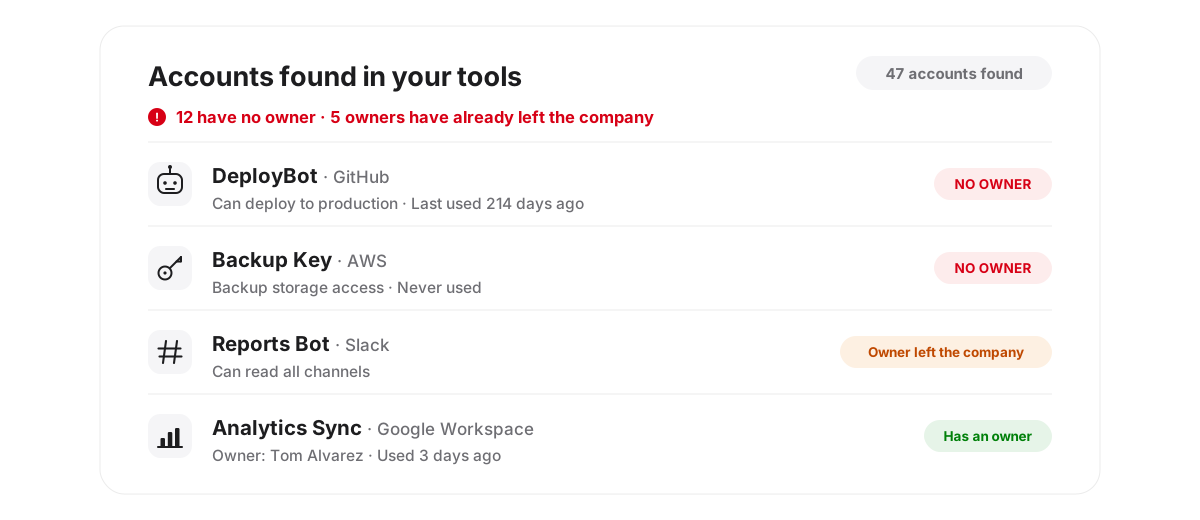
Get one list across Google Workspace or Microsoft 365 and your main SaaS tools, instead of clicking through admin consoles the week before an audit.
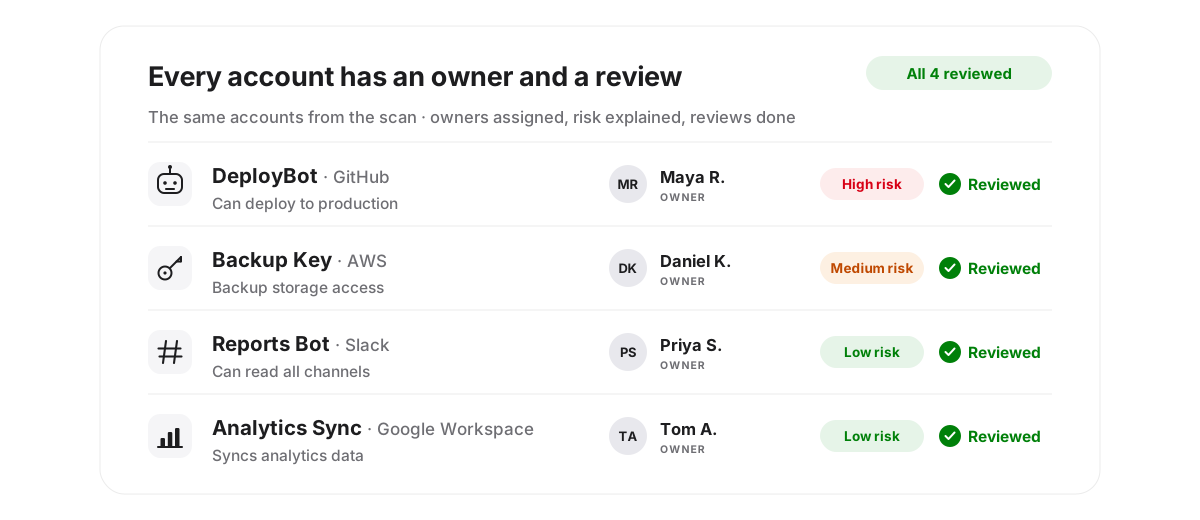
An account with no owner does not get reviewed, it gets ignored. Assign a person, set a review date, and let expiry do the chasing. When the owner leaves, the account gets flagged instead of forgotten.
Approving a list of names is not a review. Reviewers see what each account can access, when it was last used, and what it is for, so they can make a real decision. The result is an audit trail your SOC 2 or ISO 27001 auditor can follow without a screenshot scramble.
Four steps, one idea each: find everything, give it an owner, review it with real context, and hand the auditor the evidence.
Connect Google Workspace or Microsoft 365 and your key SaaS tools with read-only access. No agents to install, no changes made to your systems. You approve the exact scopes first, and you can revoke the connection at any time from your own admin console.
Prefer not to connect anything yet? Start from a CSV export instead. CSV import is a first-class way in, not a fallback.
See every AI agent, API key, service account, and integration in one place, with risk explained in plain English. Assign an owner and an expiry to each one. Anything unknown gets flagged for a decision.
When the owner leaves, the account gets flagged instead of forgotten.
Reviewers confirm, question, or flag access with the context in front of them: what each account can access, when it was last used, and what it is for.
The risk detail must be opened before a decision can be made, and high-risk keeps require a written rationale. There is no approve-all button.
Every decision is logged in an audit trail, and the evidence pack exports mapped to SOC 2 CC6/CC7 and ISO 27001 Annex A controls, in a form an auditor can use.
No screenshot scramble the week before the audit. The record already exists.
The differentiator
A review where the reviewer actually understands what they approved.
For each agent, the reviewer sees what it is, who owns it, what it can reach, when it was last actually used, and a plain-English risk explanation. Segregation-of-duties warnings appear inline. The design deliberately resists rubber-stamping.
Support automation bot
Illustrative example only, written to show the review format. It is not data from a real customer.
The risk detail must be opened before deciding. A reviewer cannot approve what they have not seen.
Keeping a high-risk identity requires a written rationale, and “risk accepted” is a distinct, auditable decision, not a default approve.
Every attestation carries an expiry, by risk level: 90, 180, or 365 days. Nothing is approved forever.
Asking a company to connect its identity systems is asking for trust. These are the rules the product is built to, stated up front.
Read-only, always in v1. We recommend; you act in your own console; the next scan verifies it happened. The tool never revokes, disables, or rotates anything.
Secret values are never read or stored. There is no secret-value column in the database by design.
Every decision is logged in an append-only, hash-chained audit trail, so tampering is detectable and an auditor can follow the record end to end.
The evidence pack exports mapped to SOC 2 CC6/CC7 and ISO 27001 Annex A controls A.5.18 and A.8.2, in a form an auditor can use.
No AI makes attestation decisions. Risk is scored by fixed, explainable rules, stated in one sentence per identity. No AI auto-approves anything. Honest coverage: some sources are limited by the platforms themselves. Coverage is stated per connector, and manual add plus CSV cover the gaps, including vendor-embedded agents no API can enumerate.
Not per user, and not per agent. Per-user pricing punishes a company for a problem that is about identities, not seats. Per-agent pricing punishes discovery: the bill rising because the product worked. Flat pricing is predictable enough to say yes to without a procurement process.
$49 / month
Up to 100 employees
Expected main tier
$99 / month
Up to 300 employees
$199 / month
Up to 1,000 employees
Annual billing at 10 months for 12 once paid plans launch. Pilot pricing is grandfathered for 12 months. Free pilot: 30 days, read-only, 1 workspace plus up to 5 tools: inventory, owner assignment, 1 full Informed Attestation review, and 1 evidence export. You keep the inventory export even if you decline. Maximum 3 concurrent pilots.
PraBin Shrestha works in identity and access management and has hands-on experience administering SailPoint Identity Security Cloud (ISC). He is the author of a research series on IAM and AI, covering informed attestation for access reviews, separation of duties for AI agents, and the identity problem created by vendor-embedded AI agents.
This product is that research turned toward a practical problem: smaller companies face the same non-human identity sprawl as large ones, without the team or the budget for an enterprise governance platform.
No customer logos are shown here because the product is in validation and has no customers to show yet. No testimonials, customer counts, or statistics are shown for the same reason. That will change only when it is true.
We are taking a small number of companies for a free, read-only pilot. You get a full inventory of your AI agents, API keys, and service accounts, with owners and risk notes, plus one guided access review. In return, we ask for one feedback call. No card, no commitment, and nothing is connected until you approve a one-page pilot outline.
Disclaimer: This product is in validation. It is not generally available yet. Joining the waitlist or taking part in a pilot does not create a contract, and pilot features and planned pricing may change based on what we learn. Nothing on this page is a guarantee of compliance or audit results.
Okta and similar tools handle sign-in, single sign-on, and lifecycle for people well. The gap this addresses is different: non-human identities created inside SaaS tools and AI platforms, API keys and service accounts that may never touch your identity provider, and the review evidence an auditor wants for them. If your current stack already inventories and reviews those accounts with owners and expiry, you may not need this. The pilot inventory will show you either way, and that answer costs nothing.
Read-only means the connection can list accounts, keys, integrations, and usage metadata, and cannot change, delete, or create anything. Secret values are never read or stored. You approve the exact scopes before connecting, you can revoke the connection at any time from your own admin console, and the pilot outline states what is read and why before anything is connected. If your policy requires it, start with a CSV export instead of a live connection and judge the value first.
Access reviews, account ownership, and evidence of periodic review are part of what SOC 2 auditors test under the logical access criteria (CC6/CC7), and ISO 27001 Annex A has equivalent expectations. This helps with that specific slice: a current inventory including non-human accounts, named owners, documented reviews where the reviewer saw real context, and a dated, hash-chained audit trail to hand over. It does not replace a compliance platform, an auditor, or your other controls, and it does not guarantee any audit outcome. No tool can honestly promise that.
The pilot is designed around Google Workspace or Microsoft 365 as the core, plus GitHub, Slack (limited: its audit data is restricted by Slack's own plan rules, and we say so up front), and AWS metadata, along with CSV import and manual add for vendor-embedded agents. The exact connector list for the pilot will be confirmed in the pilot outline for your stack. If a key tool of yours is not covered, we will tell you before the pilot starts, not after.
The pilot runs for 30 days, read-only, for one company: inventory, owner assignment support, and one guided Informed Attestation review with an exported evidence pack. At the end, you can keep the inventory export whatever you decide. Paid plans are offered only after the pilot review meeting, and saying no ends it there. No auto-conversion, no card on file.
 Put an owner and an expiry on every non-human identity
 Run access reviews a reviewer can actually stand behind


